Hungry Wheels Guides
From first launch to storm escapes—every core tutorial for Daisy Prod.’s burger-truck survival game.
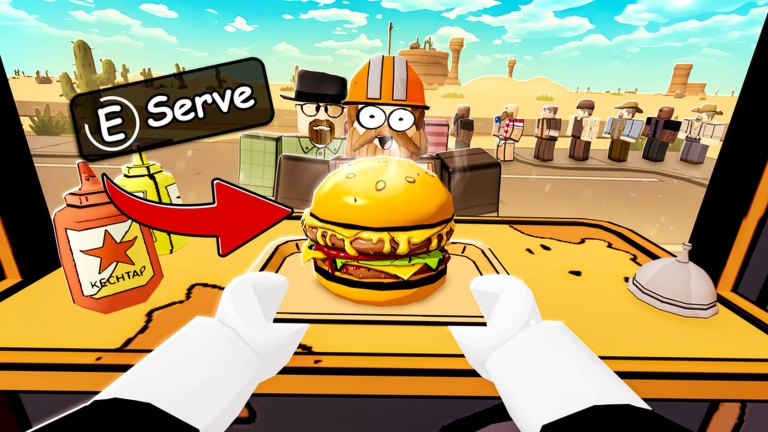
Hungry Wheels [BETA] is Daisy Prod.’s Roblox adventure of disaster survival driving. You got fired, an E5 tornado is coming, and your escape plan is an old burger truck: drive, serve customers, gather supplies, fight looters, upgrade the vehicle, and outrun the storm. Stamps fund your pre-match kit; servers hold up to 16 players; badges track milestones like Welcome, Food Truck Operator, and New and Improved.
This Guides Hub is the map to every deep tutorial on the wiki. Start with day-one basics, then branch into controls, economy, combat, badges, upgrades, and tornado routing. Cross-link sibling guides as you play so each run teaches something measurable.
Start here
Getting Started
Your first-hour checklist: join the official place, redeem codes, buy a sensible Stamps loadout, learn the serve-and-flee loop, and aim for early badges without wasting currency. Includes a redeem-focused video mid-guide.
Controls
PC and mobile driving, serving, combat, and HUD reading. Know where the Codes button lives, how truck handling feels, and how to fight looters without abandoning the wheel at the wrong time.
Economy and truck power
Stamps Shop
Stamps (Food Stamps) buy weapons, energy drinks, bandages, gasoline, and supplies before matches—and trickle in from daily quests. Learn loadout templates, code synergy, and what to skip until your truck is stronger.
Daily Quests
Farm Stamps after codes dry up. Match quest verbs to kits, refuse tornado-toxic greed, and bank surplus toward upgrades and bandage stacks.
Truck Upgrades
Upgrade paths, what to prioritize for escape speed versus service efficiency, and how the New and Improved badge ties into progression. Includes live food-truck gameplay footage mid-article.
Combat, badges, and survival
Fight Looters
Shotgun vs rifle, boss fights for King Slayer, balloon crates for Balloon Hunter, bandage saves, and when to disengage so the E5 does not win the argument.
Badges
All nine Roblox badges with official descriptions, relative rarity, and a safe hunting order that still respects fuel and flee timing. Includes the official Daisy Prod. trailer mid-guide.
Survive the Tornado
How to outrun an E5 tornado: fuel discipline, route choice, when to keep serving customers, and when to drop everything and flee. Ties directly into shop fuel buys and upgrade decisions.
How to use these guides together
Hungry Wheels punishes isolated knowledge. A player who memorizes codes but ignores fuel still dies in the chase. A player who upgrades randomly without reading the tier list wastes Stamps on soft weapons. Use this reading order for the cleanest ramp:
- Getting Started — orientation and first purchases
- Controls — stop fighting the HUD
- Stamps Shop — lock a default kit
- Daily Quests — steady Stamp income
- Survive the Tornado — practice escape timing
- Fight Looters — win fights without missing flees
- Truck Upgrades — invest Stamps into lasting power
- Badges — chase milestones on purpose
- Return to Codes and Updates whenever rewards or patches shift
What each guide assumes
All guides assume Roblox-only play on the official Hungry Wheels place (universe 8503596762). The game remains BETA: expect bugs, UI hiccups, and balance swings. Created 2025-08-21, last notable experience update around 2026-10-10, with millions of visits and a sizable favorites count—so servers are active, but polish is still catching up. When something in a guide disagrees with a fresh patch note, trust the live game and Daisy Prod. Discord, then check our Updates Hub.
We do not invent systems. Where the community lacks an official Trello, we document observed loops: Stamps economy, looter pressure, customer service windows, badge objectives, and tornado pressure. Badge names and shop categories match current player-facing labels.
Related hubs outside Guides
- Codes Hub — active promo strings and redeem steps
- Tier List Hub — S/A/B/C rankings for weapons and supplies
- Scripts Hub — AutoDrive / AutoRace / Speed overview and ban-risk notes
- Players Hub — Daisy Prod. group, Discord, 16-player etiquette
- Updates Hub — BETA status and how to track patches
- Links Hub — official Roblox link and community resources
Guide writing standards on this wiki
Every guide aims for practical depth: sectioned strategy, internal links with clear anchors, and FAQ blocks for search-style questions. Videos appear at most once per page and sit mid-article when present. If you are returning after a break, skim Getting Started plus Updates, then jump to Survive the Tornado—storm timing is usually what rusty players forget first.
Practice plan for one evening session
- Redeem any new codes, check dailies, and restock gasoline.
- Run one match focused only on clean driving and HUD comfort (controls).
- Run a second match focused on customer timing versus storm distance (survive the tornado).
- Optional third match: one controlled looter or badge objective (fight looters, badges).
- Spend leftover Stamps on the next upgrade breakpoint (truck upgrades).
- Note one mistake to fix tomorrow—fuel mismanagement, late flee, or bad weapon choice.
Follow that loop for a week and you will outpace players who only chase script shortcuts or random shop buys.
FAQ-driven browsing
If you arrived from search, match your question to a guide:
- “How do I start Hungry Wheels?” → Getting Started
- “What are the controls?” → Controls
- “What do Stamps buy?” → Stamps Shop
- “How do I farm Stamps without codes?” → Daily Quests
- “How do I upgrade the truck?” → Truck Upgrades
- “How do I fight looters / bosses?” → Fight Looters
- “What badges exist?” → Badges
- “How do I escape the tornado?” → Survive the Tornado
Open the page that matches your bottleneck, finish one full match using only that focus, then return here for the next link.
Frequently Asked Questions
Quick answers to the most common Hungry Wheels questions.
Which Hungry Wheels guide should I read first?
Start with Getting Started, then Controls, then Stamps Shop. Add Survive the Tornado before you invest heavily in upgrades.
Do these guides work while the game is in BETA?
Yes, but expect small UI or balance changes. Recheck the Updates Hub and Daisy Prod. Discord after major patches.
Is there a controls guide for mobile?
Yes. The Controls guide covers PC and mobile driving, serving, combat, and HUD differences.
Where do I learn what to buy with Stamps?
Use the Stamps Shop guide for loadouts, Daily Quests for Stamp income, and the Tier List hub for weapon and supply rankings.
How do truck upgrades tie into badges?
Upgrading the truck relates to the New and Improved badge. See Truck Upgrades and the Badges guide for the full milestone list.
Are scripts required to follow these guides?
No. All guides assume legitimate play. Script risks are documented separately on the Scripts Hub.